
How to Turn an SEO Audit Checklist Into a Fix Plan Your Team Will Ship

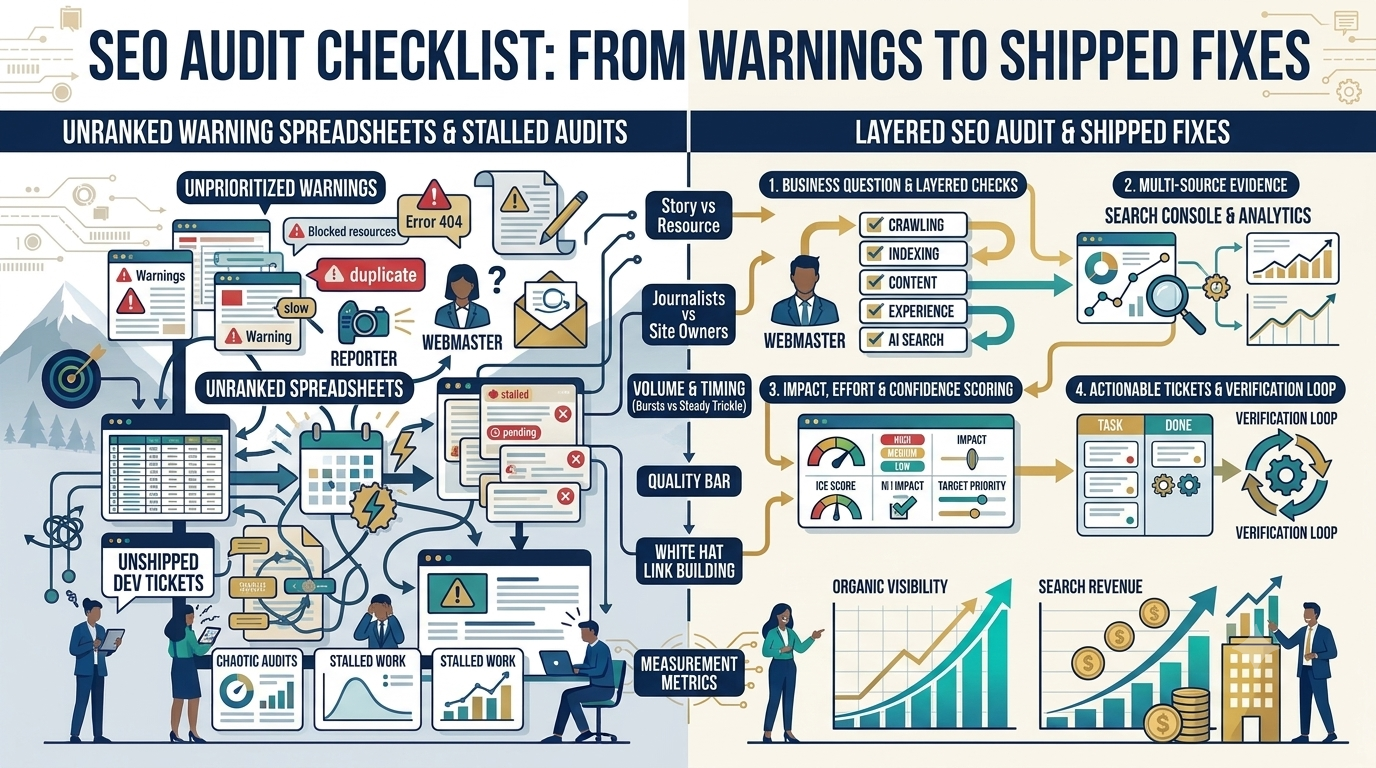
Most teams do not fail at finding SEO problems. They fail at fixing them. An SEO audit checklist can surface hundreds of warnings in an afternoon, yet months later the same broken redirects, thin pages and missing tags are still live.
The gap is rarely technical skill. It is process: unclear ownership, no sense of priority and a report written for specialists rather than the people who approve the work.
This article explains how to run an audit that ends in shipped fixes, not a forgotten spreadsheet. It assumes you already have a checklist; the focus here is on using it well.
Start with the business question, not the tool
Before anyone opens a crawler, agree on why the audit is happening. A traffic drop after a redesign, a planned migration, a new market launch and a general health check each call for a different depth and emphasis.
Write the question down in one sentence and share it with stakeholders. It keeps the audit scoped and stops the team from chasing every warning a tool produces. If you are still working out how to do an SEO audit for the first time, this framing step matters more than which software you pick.
Use the SEO audit checklist in layers
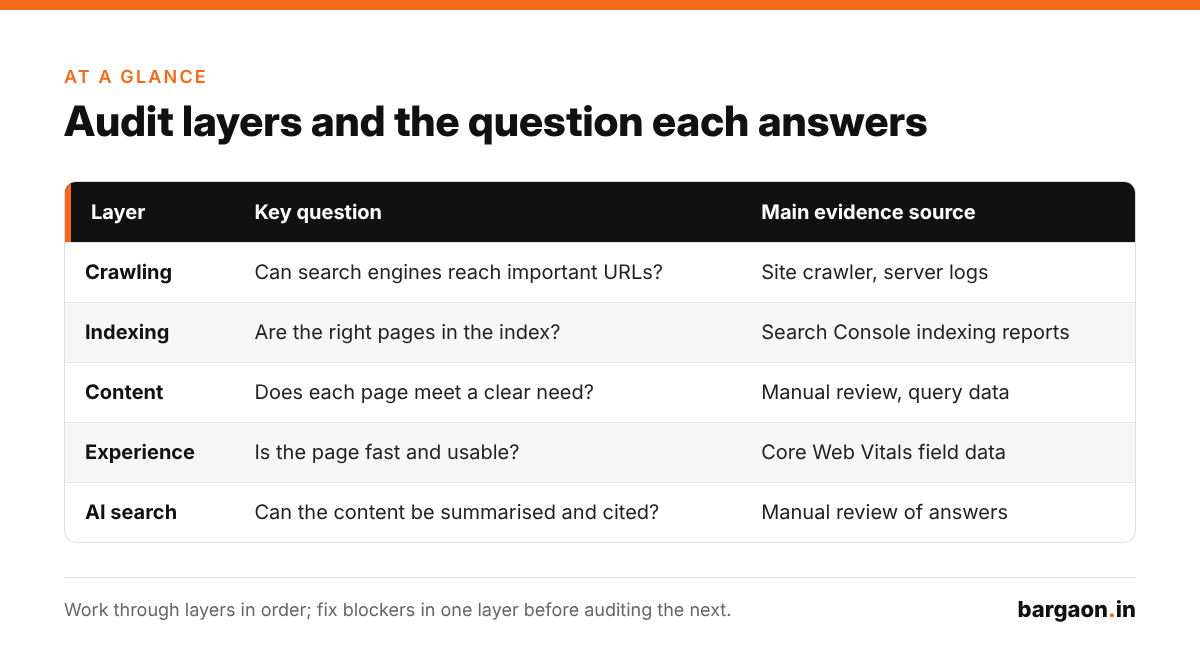
A good SEO audit checklist is organised so that each layer depends on the one before it. There is little point polishing title tags if search engines cannot crawl the page, or if the page is excluded from the index.
Work through the layers in order and stop to fix blockers before moving on. This keeps the findings honest and the fix list short.
-
Crawling: can search engines reach every important URL?
-
Indexing: are the right pages indexed, and the wrong ones kept out?
-
Content: does each page answer a clear need better than alternatives?
-
Experience: is the page fast, stable and usable on mobile?
-
AI search: is the content structured so it can be summarised and cited?
Gather evidence from more than one source
Crawl tools show what a site looks like from the outside. Search Console shows what Google actually crawled, indexed and ranked. Analytics shows what users did after they arrived. Each source has blind spots, so an issue confirmed by two of them deserves more attention than one flagged by a single tool.
Compare your findings against the basics in Google's SEO starter guide. It is a useful reality check: many audits obsess over edge cases while missing fundamentals such as descriptive titles, sensible URL structures and clear internal links.
For page experience, review field data on the Core Web Vitals metrics rather than relying only on a single lab test. Lab scores are useful for debugging, but field data reflects what real visitors experience on real devices.
Score every finding before you share it
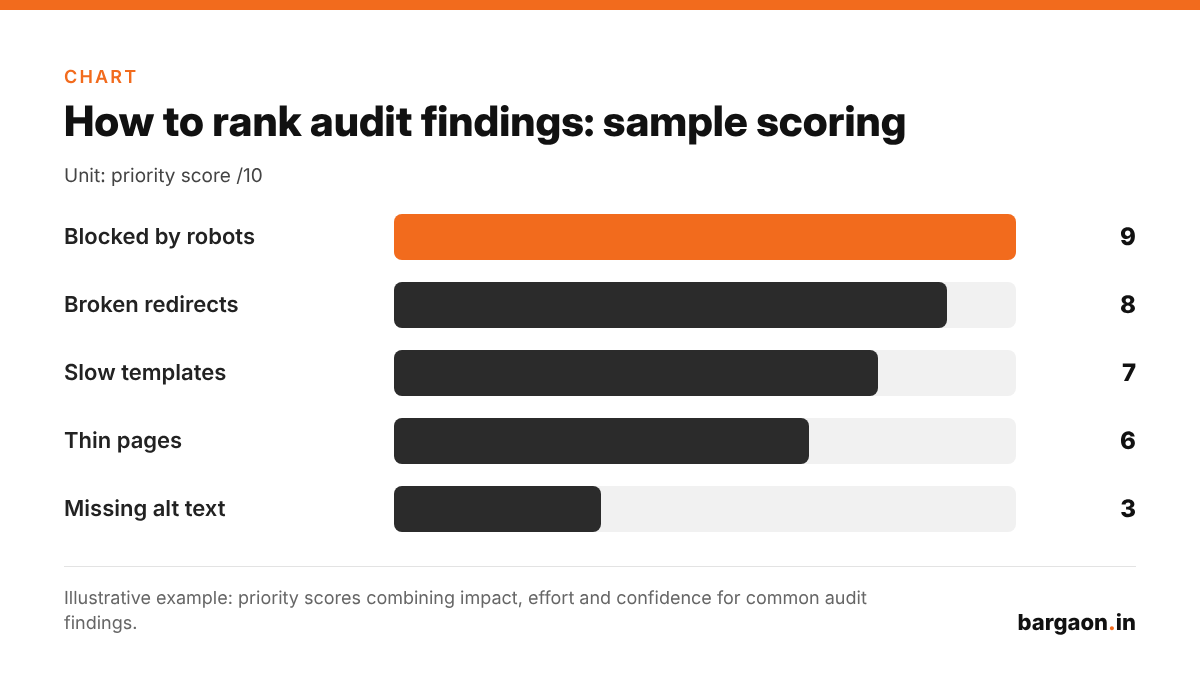
An unranked list of issues invites the wrong reaction. Developers pick the easy ones, managers panic about the scary-sounding ones, and the important fixes wait.
Give each finding three simple scores: impact on visibility or revenue, effort to fix, and confidence that the issue is real. Multiply or average them, then sort. You do not need precise numbers; a consistent one-to-five scale is enough to separate the urgent from the cosmetic.
Group related issues together as well. Fifty pages with missing meta descriptions is one task with one owner, not fifty separate tickets.
Translate findings into tickets people can act on
Each ticket should state the problem, the affected URLs or templates, the expected fix and how you will confirm it worked. Write it for the person doing the work, not for another SEO specialist.
Template-level fixes are where audits pay off. A single change to a product or blog template can correct thousands of pages at once, so look for patterns before you list individual URLs.
-
Problem in plain language, with one example URL
-
Scope: template, section or specific pages
-
Proposed fix and owner
-
How success will be checked, and when
Close the loop after fixes go live
An audit is only finished when you have verified the fixes. Recrawl the affected sections, request reindexing for priority pages and note the date each change shipped so you can read later trends correctly. Without those dates, a ranking change three months later is almost impossible to attribute to anything specific, and the team loses the evidence it needs to justify the next round of fixes.
Then schedule the next review. Large or frequently changing sites benefit from a light monthly check of crawl and index health, with a deeper audit once or twice a year. Smaller brochure sites can audit less often, but should always audit after a redesign or platform change.
Where to go from here
Running an audit this way changes the conversation with leadership. Instead of a long list of red warnings, you present a short, ranked plan with owners, effort estimates and a way to measure progress.
If you want the full set of checks behind each layer, including the newer AI search items most older checklists skip, the complete guide on Bargaon covers all 64 in detail. Use it alongside the process above, and your next audit should end with fixes in production rather than a file in a shared drive.