
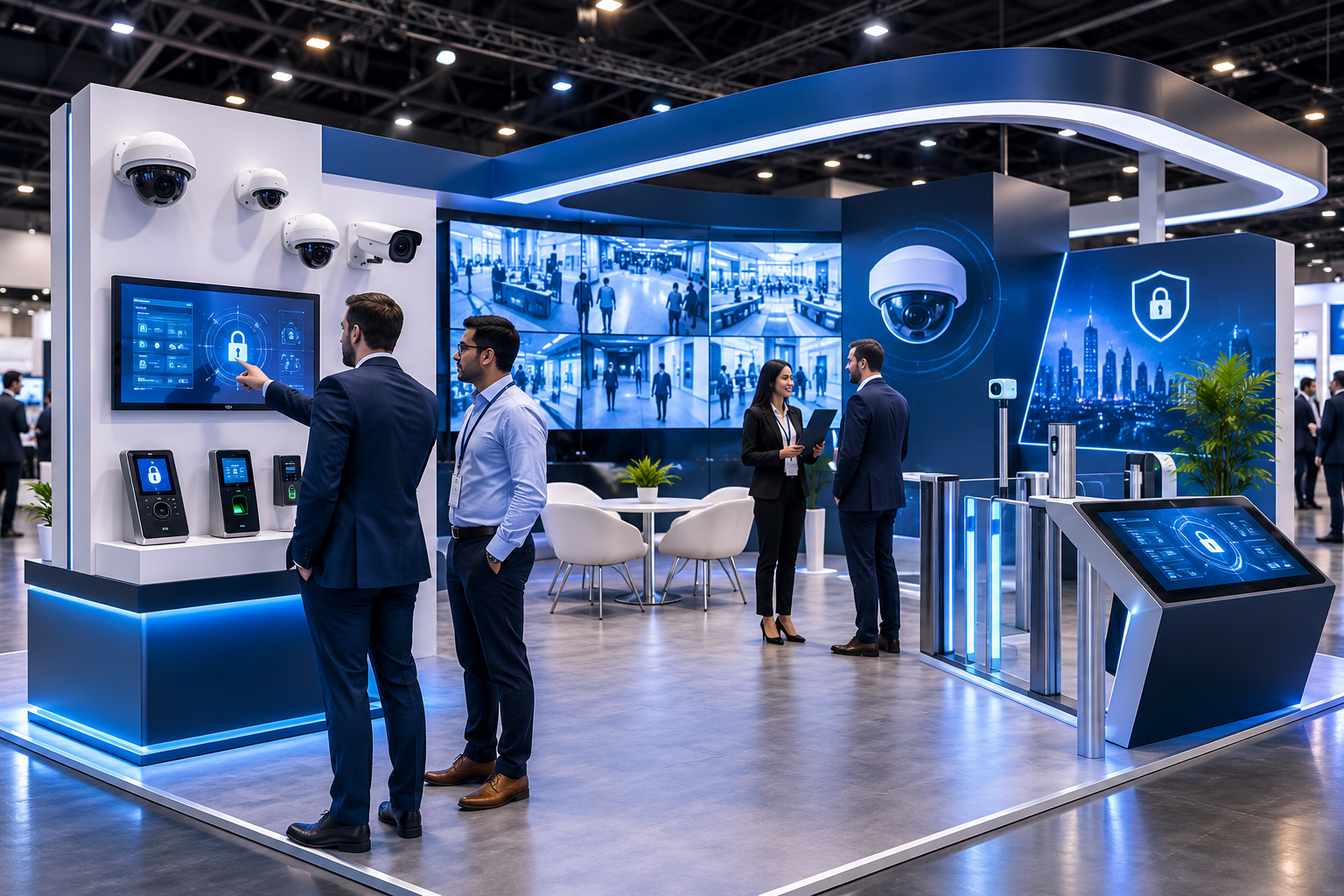
Best Layout Strategies for High-Impact Physical Security Expo Exhibits
A successful trade show booth begins with a thoughtful layout. Even the most advanced security technology can struggle to attract attention if visitors cannot easily enter, understand, and navigate the exhibit. Well-planned Physical security expo exhibits should create a natural visitor journey while balancing product displays, demonstrations, branding, technology, and conversation areas. At a major security event such as GSX – Global Security Exchange, exhibitors need a layout that captures attention quickly, communicates their value clearly, and provides enough flexibility for both quick interactions and detailed business discussions.
Why Booth Layout Matters
The layout determines how visitors experience your exhibit.
A poorly planned booth can feel crowded, confusing, or difficult to enter. Visitors may walk past without understanding what the company offers.
A well-designed layout does the opposite.
It can:
-
Attract visitors from the aisle
-
Encourage people to enter
-
Highlight important products
-
Create natural conversation points
-
Support live demonstrations
-
Improve visitor movement
-
Provide comfortable meeting areas
-
Strengthen brand presentation
Layout is therefore not simply an architectural decision. It is part of your marketing strategy.
Start With the Visitor Journey
Before placing a single product, think about how visitors will move through the booth.
A useful visitor journey is:
Notice → Enter → Discover → Interact → Discuss → Connect
First, the visitor notices your brand from the aisle.
Next, an open entrance encourages them to enter.
Then, they discover your main solutions.
Interactive demonstrations create deeper engagement.
A meeting area allows detailed discussion.
Finally, a clear call to action creates the next step.
Every area of the booth should support this journey.
Create an Open Entrance
One of the most important layout principles is accessibility.
Do not block the entrance with large furniture, counters, or displays.
An open entrance makes the booth feel welcoming.
Visitors should be able to see into the exhibit without feeling that they have to commit to entering.
Consider creating multiple entry points when the booth size allows it.
This can make the space feel more open and accessible from different directions.
Use the Back Wall Strategically
The back wall is often one of the most visible areas of a booth.
Use it to communicate your primary brand message.
It could include:
-
Company logo
-
Main headline
-
Key value proposition
-
Large product image
-
Brand imagery
Avoid turning the wall into a brochure.
Visitors should be able to understand the primary message within a few seconds.
A strong back wall can serve as the visual anchor for the entire booth.
Create Clear Zones
Dividing the booth into functional zones can make navigation easier.
For example:
Brand Zone
Communicates who you are.
Product Zone
Showcases your main solutions.
Demonstration Zone
Allows visitors to see technology in action.
Consultation Zone
Supports business conversations.
Meeting Zone
Provides space for qualified prospects.
Storage Zone
Keeps operational materials hidden.
Each area should have a clear purpose.
Use a Logical Product Flow
If you have several product categories, arrange them in a logical order.
For example:
Detect → Verify → Respond → Monitor
A visitor could move through the exhibit and see how your security solutions work together.
This is more effective than placing unrelated products throughout the space.
A logical product flow also makes it easier for staff members to explain the complete solution.
Position Your Most Important Product Where It Gets Attention
Not every product deserves equal space.
Your most important solution should receive a prominent location.
This could be:
-
Near the main entrance
-
In the center of the booth
-
Next to the primary demonstration
-
Under strong lighting
-
On a dedicated display structure
Choose the location based on what you want visitors to remember.
Build a Strong Demonstration Area
Demonstrations often become the most engaging part of a security booth.
The demonstration area should be easy to see from the aisle.
However, it should not block traffic.
Consider positioning the demonstration station slightly inside the booth so visitors naturally enter the space to see it.
Make sure screens are visible and products can be examined comfortably.
Avoid Traffic Bottlenecks
Crowded areas can discourage visitors.
For example, placing a demonstration table directly next to the entrance may cause people to stop and create a barrier.
Similarly, oversized furniture can make narrow areas difficult to navigate.
Maintain clear pathways.
Visitors should be able to move naturally without bumping into displays or other people.
Design for Different Interaction Lengths
Not every visitor needs the same experience.
Some visitors may spend only 30 seconds at the booth.
Others may stay for 15 or 20 minutes.
Your layout should support both.
For quick visitors, provide:
-
Large headlines
-
Clear product visuals
-
Short messages
For engaged visitors, provide:
-
Demonstrations
-
Interactive displays
-
Product information
For qualified prospects, provide:
-
Meeting areas
-
Consultation spaces
-
Technical discussions
This layered layout makes the booth more flexible.
Use Vertical Space
Booth layouts are not limited to the floor.
Vertical elements can improve visibility.
Consider using:
-
Tall signage
-
Hanging signs
-
Vertical product displays
-
Illuminated walls
-
Suspended branding
-
Architectural structures
Vertical branding can help visitors identify your booth from farther away.
However, all structures must comply with the venue and event's height and safety requirements.
Place Branding at Multiple Levels
Your company name should be visible from different positions.
A visitor walking directly toward the booth should see your branding.
Someone walking past from the side should also be able to identify you.
Use branding on:
-
Back walls
-
Side walls
-
Hanging signs
-
Product displays
-
Digital screens
-
Reception counters
Maintain consistency across all elements.
Create Comfortable Meeting Areas
A security trade show is not only about attracting visitors.
It is also about having meaningful conversations.
Your layout should provide space for business discussions.
Depending on booth size, consider:
-
Open consultation tables
-
Semi-private meeting areas
-
High-top counters
-
Lounge seating
-
Private meeting rooms
Place meeting areas away from the busiest traffic zones when possible.
This allows conversations to continue without constant distractions.
Use Semi-Private Spaces for Sensitive Discussions
Security professionals may discuss operational details that they do not want to share openly.
A semi-private meeting space can provide more comfort.
You can create privacy using:
-
Partial walls
-
Screens
-
Architectural panels
-
Plants
-
Shelving
-
Frosted graphics
The goal is to provide separation without completely closing the booth.
Use Lighting to Guide Visitors
Lighting can help direct attention.
For example, brighter focused lighting can highlight a product or demonstration.
Subtle lighting can define meeting areas.
Illuminated branding can attract visitors from the aisle.
Lighting can therefore become part of the layout strategy rather than an afterthought.
Keep Storage Out of Sight
Storage is essential but should not dominate the visitor experience.
You may need space for:
-
Brochures
-
Promotional materials
-
Personal belongings
-
Packaging
-
Cleaning supplies
-
Replacement equipment
Use integrated storage wherever possible.
Hidden cabinets, counters, or back-of-booth storage can keep the visitor-facing area clean.
Design Around Your Technology
If your exhibit includes digital technology, plan the layout around it.
Large screens need appropriate viewing distances.
Touchscreens need enough space for visitors to interact.
Demonstration equipment may require electrical connections.
Audio equipment should be positioned carefully so it does not disturb meeting areas.
Technology should be integrated into the booth architecture rather than added at the last minute.
Create a Clear Call to Action
The layout should lead visitors toward a next step.
Possible calls to action include:
-
Schedule a consultation
-
Request a product demonstration
-
Scan for technical information
-
Meet with an expert
-
Download a product guide
-
Book a follow-up meeting
Place calls to action where visitors naturally finish their journey.
For example, a QR code near the exit can allow visitors to receive additional information after their conversation.
Consider Sight Lines
A good layout provides clear sight lines.
Visitors should be able to see:
-
Your logo
-
Main message
-
Key products
-
Demonstrations
-
Staff
-
Meeting areas
Avoid placing tall structures where they completely block important content.
Think about the booth from the visitor's perspective at different distances.
Make the Booth Look Good From Every Direction
Depending on the floor plan, visitors may approach from several directions.
Do not design only the front.
Side walls should also communicate your brand.
If the booth is accessible from multiple aisles, use multiple attraction points.
This can increase traffic and prevent one side of the booth from becoming inactive.
Match Layout to Booth Size
Different booth sizes require different strategies.
Small Booths
Focus on:
-
One strong message
-
One key product
-
Compact demonstrations
-
Open access
-
Minimal furniture
Medium Booths
Add:
-
Multiple product zones
-
Demonstration areas
-
Consultation tables
-
Digital displays
Large Booths
Consider:
-
Multiple product categories
-
Immersive experiences
-
Presentation theaters
-
Private meeting rooms
-
Hospitality areas
-
Larger technology installations
The layout should always match the available space.
Avoid the “Everything on Display” Problem
Trying to showcase every product can make a booth confusing.
Instead, select products that support your exhibition goals.
Ask:
-
Which products are most important?
-
Which products are new?
-
Which products generate the most interest?
-
Which products can be demonstrated?
-
Which products differentiate us from competitors?
Then build the layout around those priorities.
Use Visual Hierarchy
Visitors should know where to look first.
Create a hierarchy:
Primary: Brand and main message
Secondary: Main solution
Tertiary: Supporting products
Additional: Technical information
This prevents the booth from becoming visually overwhelming.
Make the Layout Staff-Friendly
Your employees need to work within the space too.
Staff should be able to move between:
-
Entrance
-
Demonstration area
-
Product displays
-
Meeting spaces
-
Storage
without interfering with visitors.
Provide enough room behind counters and displays.
A booth that looks good but is difficult for staff to operate can create unnecessary problems.
Plan for Peak Traffic
Consider what happens when several visitors arrive at once.
Can multiple people interact with the booth simultaneously?
Can one visitor watch a demonstration while another speaks with a representative?
Can two sales conversations happen without interfering with each other?
Flexible layouts are better equipped to handle busy periods.
Use Interactive Displays Without Creating Congestion
Interactive displays can attract visitors quickly.
But if several people gather around one screen, traffic can become difficult.
Consider using multiple smaller interactive points instead of one oversized attraction.
Alternatively, position the screen deeper inside the booth so that visitors naturally enter rather than stopping in the aisle.
Create a Strong First Impression
The first few seconds matter.
When a visitor sees your booth, they should immediately understand:
-
Who you are
-
What you do
-
What makes you different
The layout, graphics, products, and lighting should communicate these points together.
A clear first impression can encourage visitors to stop.
Make the Experience Educational
The best booth layouts do not simply guide visitors from one product to another.
They guide visitors through a story.
For example:
Security Challenge → Detection → Verification → Response → Monitoring → Outcome
This structure helps visitors understand how your solutions work together.
It also gives staff a natural framework for demonstrations.
Coordinate Layout With Your Booth Builder
Professional booth builders can help transform your strategy into a functional design.
They can evaluate:
-
Floor space
-
Structural requirements
-
Electrical needs
-
Lighting
-
Graphics
-
Product weight
-
Storage
-
Technology
-
Visitor movement
-
Installation requirements
A good booth builder can identify layout issues before construction begins.
Test the Layout Before the Event
If possible, review the design from multiple perspectives.
Look at the booth from:
-
The main aisle
-
Side aisles
-
The entrance
-
Inside the booth
-
Meeting areas
Ask whether important messages and products remain visible.
A 3D visualization can be particularly helpful because it allows the team to identify potential issues before fabrication.
Measure Layout Performance
After the event, evaluate which areas received the most engagement.
Track:
-
Visitor traffic
-
Product interactions
-
Demonstration participation
-
Meeting requests
-
Lead generation
You may discover that visitors gathered around one product while another area remained underused.
These insights can guide future layouts.
Common Layout Mistakes to Avoid
Blocking the Entrance
Large counters or displays can make the booth difficult to enter.
Too Much Furniture
Furniture can consume valuable space.
Poor Sight Lines
Important products may become hidden.
Crowded Demonstrations
Popular displays can create congestion.
No Meeting Space
Qualified prospects may have nowhere comfortable to talk.
Excessive Signage
Too many messages can create visual confusion.
Ignoring Storage
Visible boxes and personal belongings can weaken professionalism.
A Practical Layout Formula
A simple approach for many security exhibitors is:
30% Product & Demonstration
25% Visitor Interaction
20% Meeting & Consultation
15% Branding & Messaging
10% Storage & Operations
These percentages are only a starting point. The right balance depends on the company's goals and booth size.
Final Thoughts
An effective booth layout should make the visitor experience feel effortless. People should be able to recognize the brand from the aisle, enter without obstacles, understand the company's solutions, interact with products, speak with knowledgeable staff, and move toward a clear next step.
The best Physical security expo exhibits use layout as a strategic tool rather than simply arranging walls, furniture, and displays. By creating open entrances, clear zones, strong sight lines, interactive demonstration areas, comfortable meeting spaces, and logical visitor journeys, exhibitors can create a booth that works for both visitors and staff. With careful planning and professional execution, a thoughtful layout can help transform exhibition space into an engaging environment that attracts attention, supports meaningful conversations, and strengthens business opportunities.